Every year seems to be “the year of” something in cybersecurity. For example, in 2013, it was “the year of the financial breach.” In 2014, the “year of the retail hack.” In 2015, we saw at shift to healthcare and, in 2016, ransomware reigned and even democracy came under fire.
2017 is already shaping its own theme. Research from prominent third parties, as well Carbon Black’s own research, indicates that 2017 may become “the year of non-malware attacks.”
Non-malware attacks have been in the news a lot recently but first let’s take a step back and understand what we’re up against and what can be done.
Defining “Non-Malware” Attacks
A non-malware attack is one in which an attacker uses existing software, allowed applications and authorised protocols to carry out malicious activities. Non-malware attacks are capable of gaining control of computers without downloading any malicious files, hence the name. Non-malware attacks are also referred to as fileless, memory-based or “living-off-the-land” attacks.
With non-malware attacks, an attacker is able to infiltrate, take control and carry out objectives by taking advantage of vulnerable software that a typical end user would leverage on a day-to-day basis (think web browsers or Office-suite applications). Attackers will also use the successful exploit to gain access to native operating system tools (think PowerShell or Windows Management Instrumentation – WMI) or other applications that grant the attacker a level of execution freedom.
These native tools grant users exceptional rights and privileges to carry out the most basic commands across a network that lead to valuable data.
Non-Malware Attack Example
Non-malware attacks leverage a robust suite of tactics and techniques to penetrate systems and steal data without using malware at all. They have grown in prevalence in recent years as attackers have developed ways to launch these attacks at large scale.
Let’s take a look at an example attack:


- A user visits a website using Firefox, perhaps driven there from a cleverly disguised spam message.
- On this page, Flash is loaded. Flash is a common attack vector due to its seemingly never-ending set of vulnerabilities.
- Flash invokes PowerShell, an OS tool that exists on every Windows machine, and feeds it instructions through the command line — all operating in memory.
- PowerShell connects to a stealth command and control server, where it downloads a malicious PowerShell script that finds sensitive data and sends it to the attacker. This attack never downloads any malware.
Why Are Non-Malware Attacks on the Rise?
Why are non-malware attacks on the rise? Simply put, they work.
Some leading attack campaigns in 2016, including PowerWare and the alleged hack against the Democratic National Committee (DNC) leveraged non-malware attack vectors to carry out nefarious actions.
Almost every Carbon Black customer (97%) was targeted by a non-malware attack in 2016. Their ubiquity is clear and growing. Over a 90-day period, one-third of organisations can expect to be targeted by a severe, non-malware attack.
There is a common theme why cybercriminals are increasingly leveraging non-malware attacks: they are following the path of least resistance.
Many current endpoint security solutions (such as traditional AV and machine-learning AV) do nothing to prevent (or even detect) non-malware attacks, providing attackers with a point of entry that goes completely overlooked.
Traditional AV and machine-learning AV are designed to only identify threats at a single point in time – when a file is written to disk. Since they only look at the attributes of an executable file, they are completely blind in the face of attacks where no files are involved – as is the case with non-malware attacks.
If the goal of an attack is to gain a foothold or exfiltrate valuable data, then non-malware attacks accomplish this goal without fear of detection, especially when organisations are relying on legacy AV and machine-learning AV.
Streaming Prevention: A New Approach to Endpoint Protection
Streaming prevention offers a fundamentally new approach to identifying and preventing cyberattacks. Current approaches used by legacy AV and machine-learning AV focus exclusively on files and do nothing to target an attacker’s behaviours.
In contrast to legacy AV and machine-learning AV, streaming prevention monitors the activity of applications and services, including communications between processes, inbound and outbound network traffic, unauthorised requests to run applications, and changes to credentials or permission levels.
Streaming prevention doesn’t just monitor individual events on an endpoint; it monitors and analyses the relationships among events.
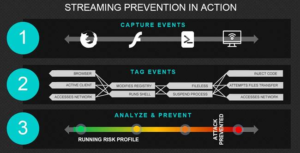
Sticking with the example above, browsing the web, running Flash and invoking PowerShell are each, in their own right, viable and necessary events, but what about when they appear as a cluster of events? It’s simply not normal behaviour and, as such, can be tagged, flagged and automatically shut down by streaming prevention before the attacker can carry out objectives.